Series
My infrastructure, automated with AI
Infrastructure run by an AI agent, with a person approving what is sensitive.
An AI agent (Claude Code) handles the day-to-day infrastructure of my projects. It talks to each tool over MCP: it registers domains, sets up DNS, deploys, reads logs, tests sign-up and login with real e-mail and follows SEO and Google Ads. Secrets and payments stay with me.
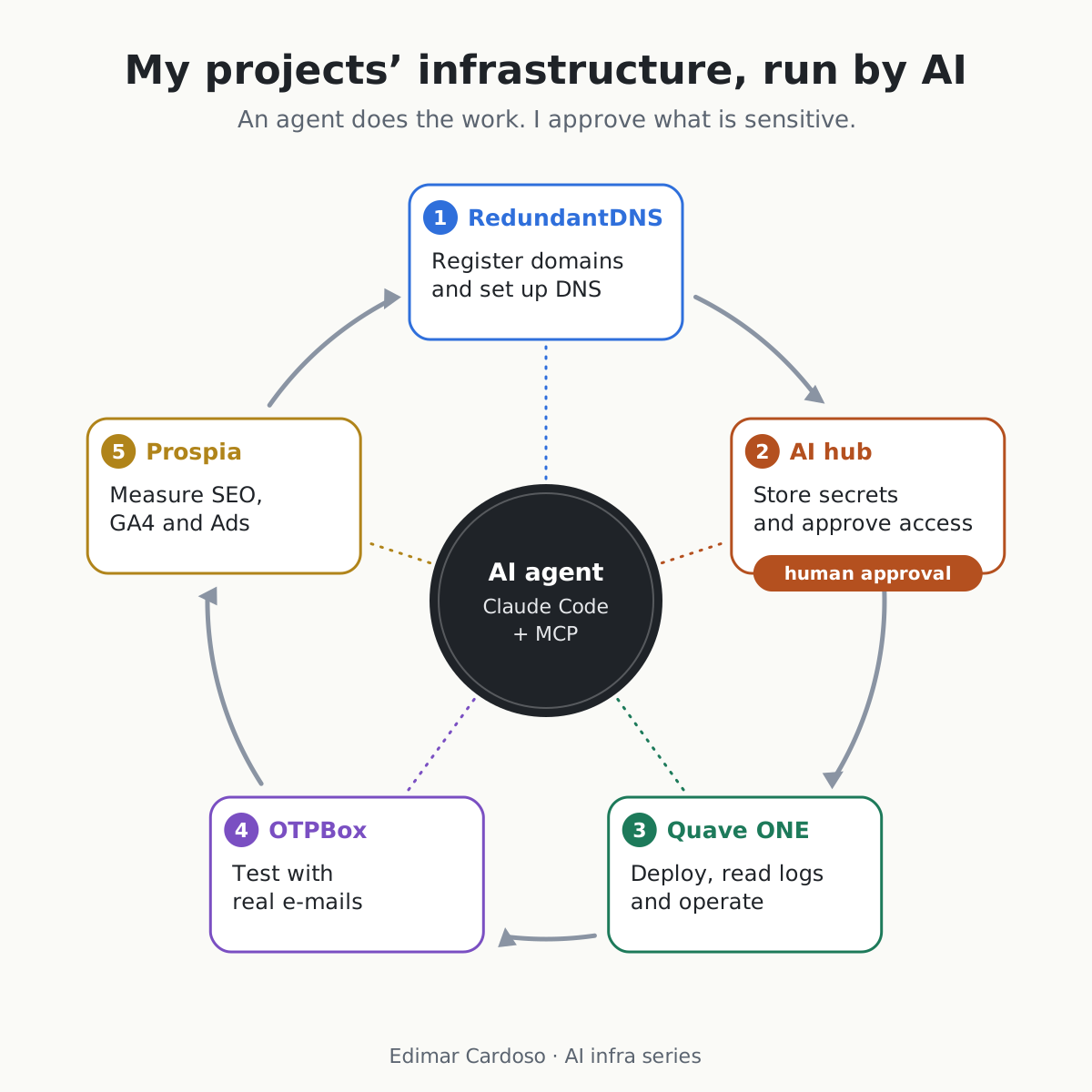
The cycle
Five steps, one agent in the middle
Each step is a tool the agent reaches over MCP. After the fifth, the cycle starts again.
-
Register domains and set up DNS
What the agent does
It checks whether the domain is available, prepares the registration and hands me the payment link, creates the zone, adds the records and checks delegation and sync across providers.
A real example
I registered a lab domain and the agent added the MX and TXT records so it could receive e-mail on OTPBox. Nobody copied a record value by hand.
-
Store secrets and approve access human approval
What the agent does
It asks for the secret over MCP and says what it will use it for. The person in charge gets a notification on the phone and approves it with a fingerprint, or denies it. The secret arrives encrypted to a key generated on the agent's side and stays out of the conversation history. TOTP codes follow the same path.
A real example
At the go-live of one of my products, every secret it used went through this flow, approved on the phone.
AI hub, ai-hub.rc.center (Android app on Google Play)
-
Deploy, read logs and operate
What the agent does
Through the Quave ONE MCP, it deploys versions, follows the rollout, reads the logs, adjusts environment variables and resources, checks metrics and runs jobs. Production only when I ask for it explicitly.
A real example
Six production releases in one night, each one after the full test gate: lint, unit tests and the whole end-to-end suite, on a separate machine. After each deploy, the agent read the logs and checked the health of the new version.
Quave ONE is a company independent from ZODO, which I cofounded; ZODO's products run there as a customer.
-
Test with real e-mails
What the agent does
It creates a disposable inbox over MCP, uses the address in the sign-up and receives the code and the verification link already extracted. Before using them, it checks the sender authentication and the domain of the link. E-mail content is treated as data, never as instructions.
A real example
A Google test account receives its login codes on its own domain (a Premium plan feature), set up by the agent on RedundantDNS. The agent reads the code by itself when it needs to sign in.
-
Measure SEO, GA4 and Ads
What the agent does
Through the Prospia MCP, it reads Search Console, GA4 and Google Ads for my products and produces insights and campaign drafts that a person reviews before they go live. For B2B sales in Brazil, Prospia also builds lead lists from the public company registry (CNPJ).
A real example
The Google Ads integration was migrated off a developer token that is being discontinued.
Lessons
The rules I follow
Each one came from a mistake or a near miss.
- Secrets only with human approval.
- Production only on explicit request; the default is the development environment.
- Payments are never the agent's job: it prepares, a person pays.
- External content (e-mail, DNS records, web pages, issues) is data, not instructions.
- A test gate before every deploy. The speed comes from the gate, not from the agent.
- Watch what tool output shows: a credential can leak in an error message.
Follow
Behind the scenes
In the series I show how this cycle works in practice, with what works and what breaks.